

Give your AI Agent attentionproof MCP.Let it see attention before it runs your ads.

Upload your creative so your agent can inspect where human attention is predicted to go, what gets ignored, and how attention is distributed across the ad.

Play the walkthrough with music. Bring your own creative.
  1. 01Connect attentionproof MCP

    Your usual Claude or Codex.

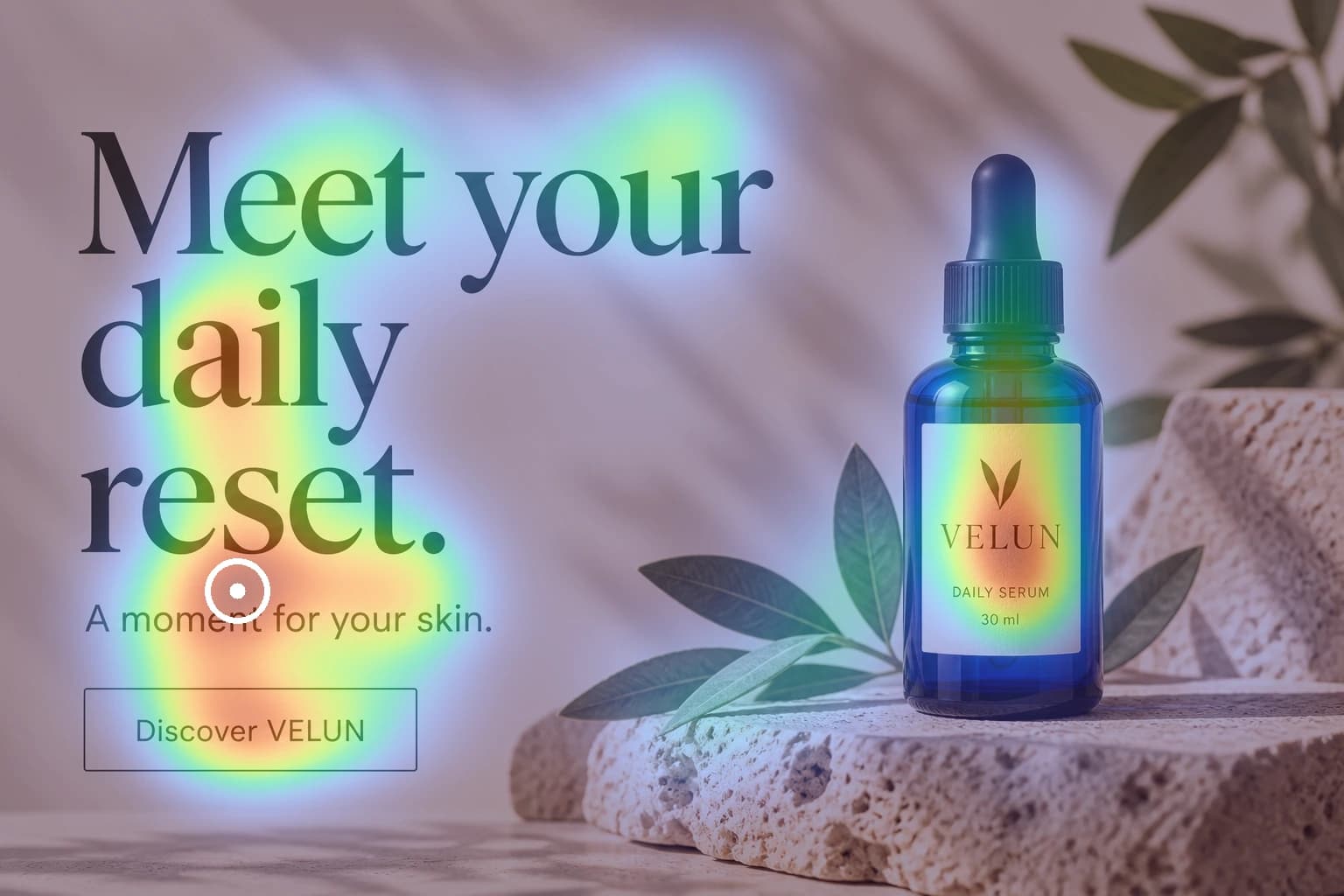
  2. The original product ad with its predicted attention heatmap

    02See what stands out

    Give your agent attention data.

  3. The revised product ad with a larger bottle, a different headline and a clearer shopping action

    03Make a different ad

    Recheck. Compare. A/B test.

GO BEYOND.

Help people understand
what you create.

Make the important parts easier to notice. Give people a clearer next step.

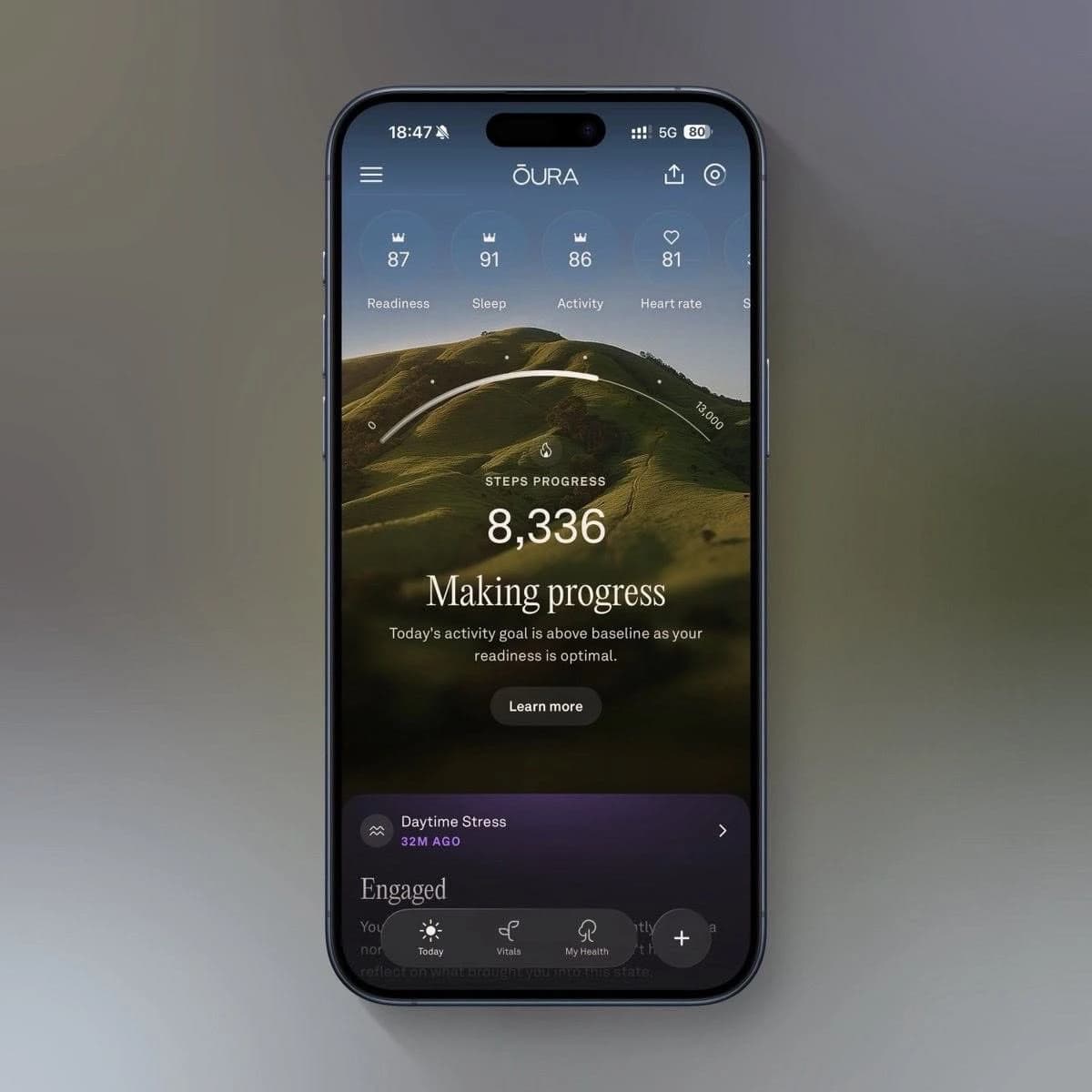
The intention

Help someone see their progress.

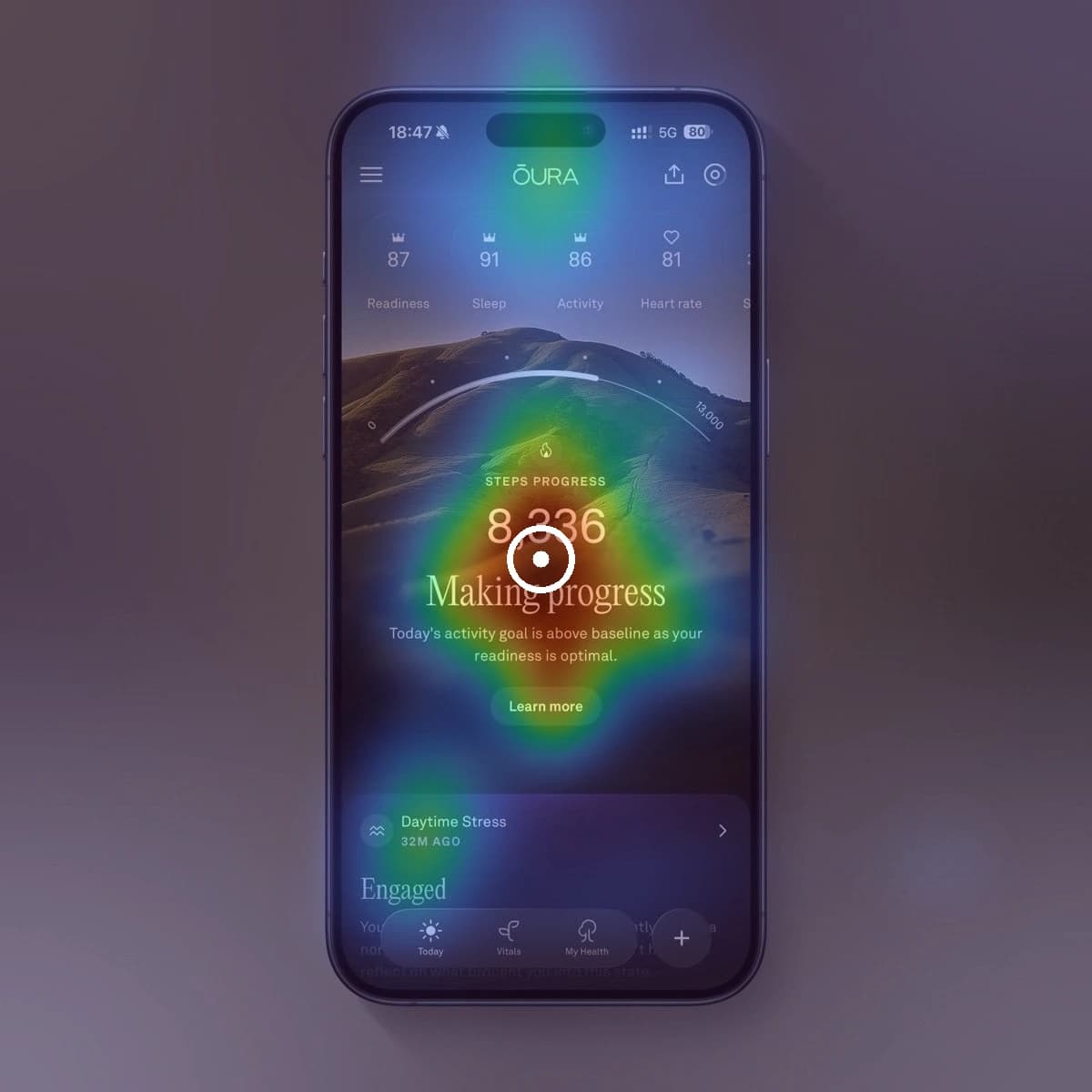
Oura app on a phone, showing 8,336 steps, Making progress, and a Learn more buttonComputed attention heatmap, strongest around the step count and Making progress headline
Predicted attention

Tap an element on the phone to see its predicted attention share.

Lower Higher

Oura UI example. Independent analysis, not an endorsement.

See it from their side.

A real screen. A reason to make it clearer.

How am I doing?

What does it mean?

What can I do next?

Share of predicted attention across the full image.

The story behind attentionproof

I got tired of explaining what should stand out.

Dmitry Baranau, founder of attentionproof

Dmitry Baranau Founder, attentionproof

  1. 01 / The loop

    Every draft needed my eyes.

    I design UI and create visuals with my Codex agent. Some looked great. Others missed the point, so I kept reviewing and re-explaining.

  2. 02 / The question

    Then I saw TRIBE v2.

    Meta’s TRIBE v2 research demo sparked a question: could my agent inspect predicted visual attention in the images we make?

  3. 03 / The answer

    So I built attentionproof.

    With 8+ years in engineering, I built our own heatmap model. I use it in client work now. It saves me hours of back-and-forth.

Thoughtful visual decisions, without a whole agency team. That’s my secret sauce.

Compare monthly plans

What does a month of creative checks cost?

Start with the price of a 100-analysis alternative. Then compare what each plan includes.

EyeQuant Pro · one-user app viewUS$149 / month100 analyses per month
AttentionProof ProUS$49.99 / month100 image checks per monthChoose Pro

EyeQuant’s US$149 price comes from a one-user app view supplied September 25, 2026; its public page asks visitors to contact sales. Tools and usage units differ. Apple confirms your local AttentionProof price.

Compare all plans and included use

Swipe or scroll sideways to compare all three.

AttentionProof

Checks for your images
Plan / priceIncluded use

Your first 5 checks are free. 30 checks each month on Starter. 100 checks each month on Pro.
EyeQuant

1-user app view
Plan / priceIncluded use
  • SoloUS$79 / mo50 analysesUS$1.58 per analysis
  • ProUS$149 / mo100 analysesUS$1.49 per analysis
  • UnlimitedUS$219 / moUnlimited*No fixed per-analysis price
View EyeQuant public plans

Attention Insight

USD estimate · EUR source
Plan / priceIncluded use
  • Basic≈US$32.96 / mo40 credits€29 / month at source≈US$0.82 per 1-credit image test · €0.73 at source
  • Pro≈US$135.27 / mo200 credits€119 / month at source≈US$0.68 per 1-credit image test · €0.60 at source
  • Hero≈US$339.87 / moUnlimited*€299 / month at sourceNo fixed per-credit price
View Attention Insight pricing

Per-image figures divide monthly price by the full stated allowance; they are not pay-as-you-go prices. AttentionProof shows US reference prices; Apple confirms your local price before purchase. EyeQuant prices are from the one-user monthly app view supplied September 25, 2026; its public site currently uses a different plan catalogue and asks visitors to contact sales for prices. Attention Insight charges in EUR; its approximate USD figures use the September 24, 2026 ECB reference rate of €1 = US$1.1367, not a live payment exchange rate. Its credits can also pay for URLs, AI recommendations or video, and longer images can use multiple credits. An analysis or credit is not necessarily equivalent to one AttentionProof check. *Unlimited plans have usage terms or fair-use limits. Prices and terms can change. Neither company is affiliated with AttentionProof.

Your iPhone. Your AI. One balance.

Choose on iPhone.
Keep creating with AI.

Choose your plan in the AttentionProof app. Use the same Apple Account to bring your checks to the web, Claude and Codex.

Continue to iPhone app

Each ad or variant you analyze uses one check. Unused paid checks do not expire.

Your next creative direction starts here.

Start with 5 free checks.

Try your UI or any image. No card or automatic upgrade.

US reference prices. Apple shows your local price, taxes and renewal terms before purchase. Monthly subscriptions renew automatically until canceled in Apple subscription settings. Free checks are a one-time allowance per account. Failed analyses return the check. Your agent and image-generation costs are separate.

One UI, three predictions

Which heatmap would you trust?

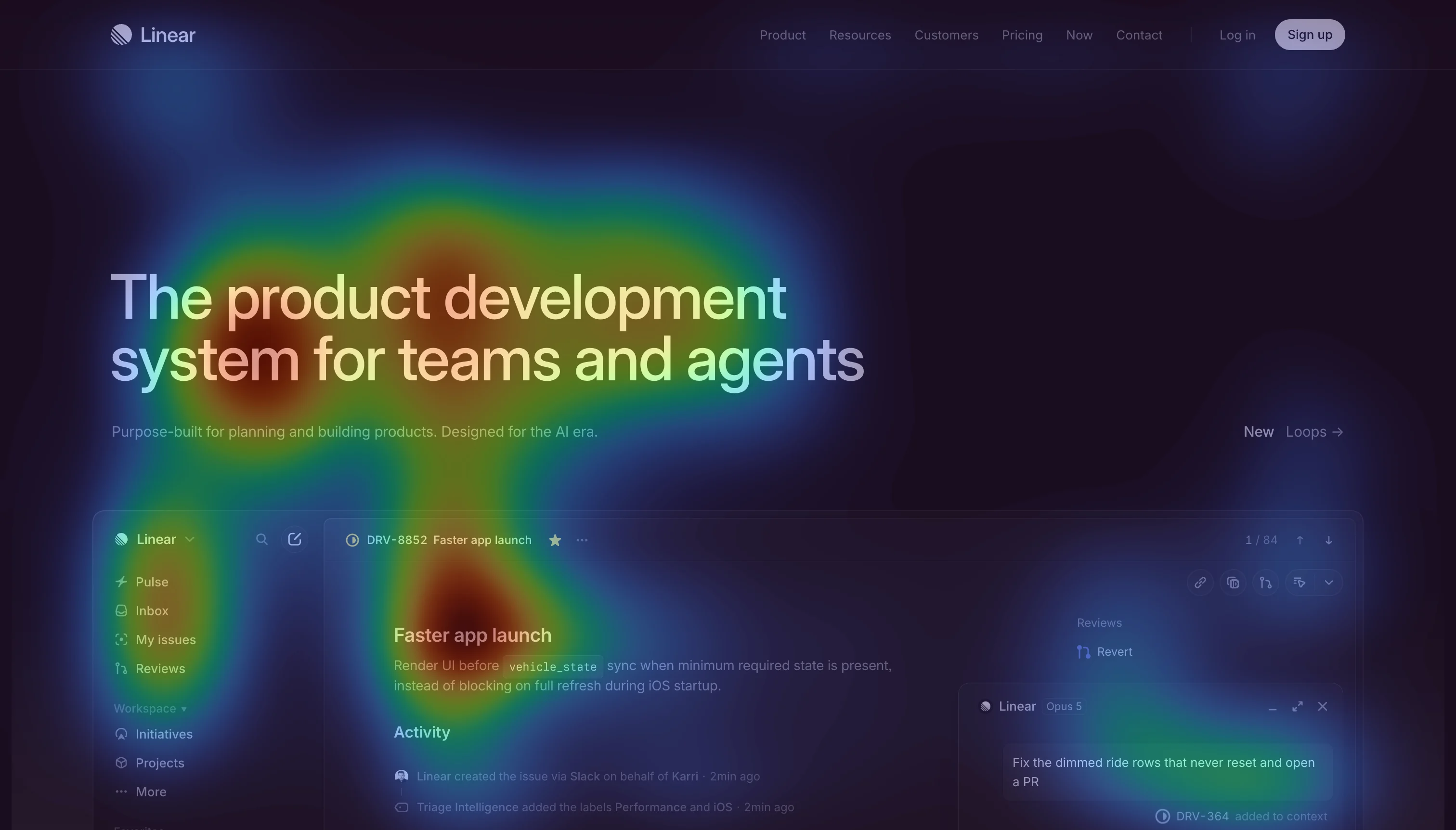
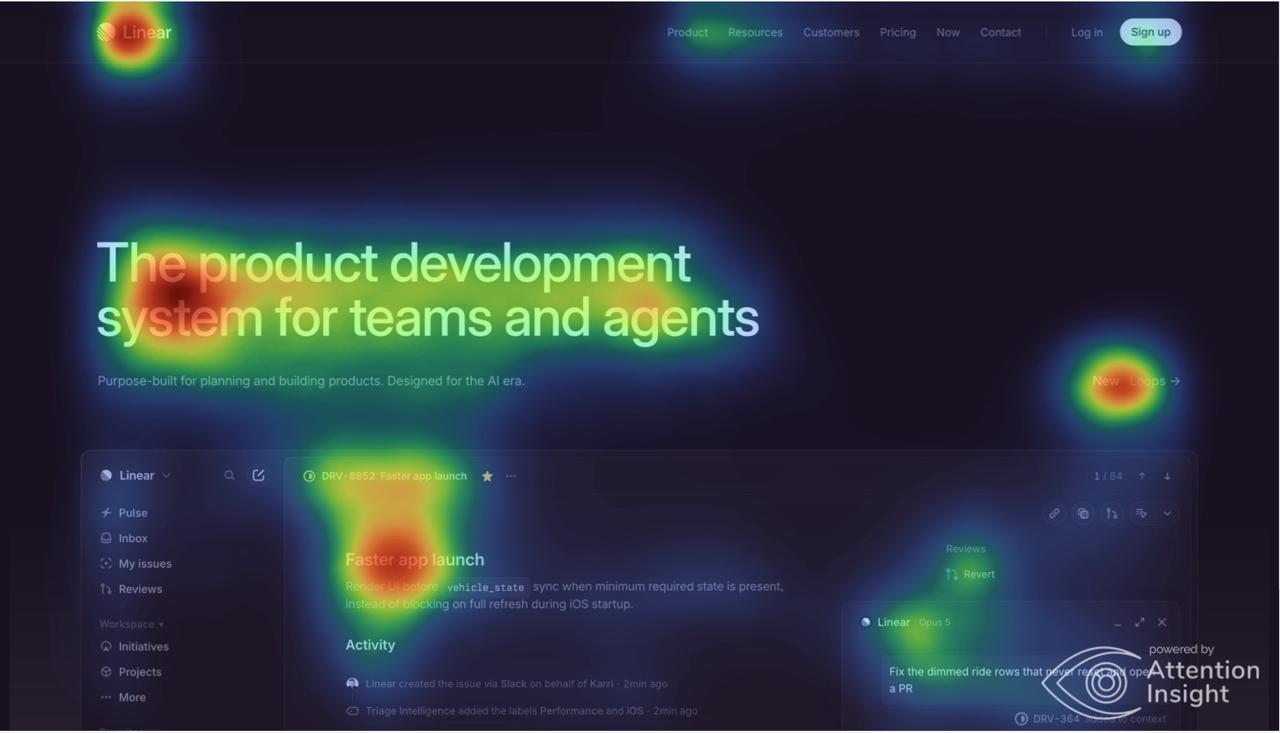
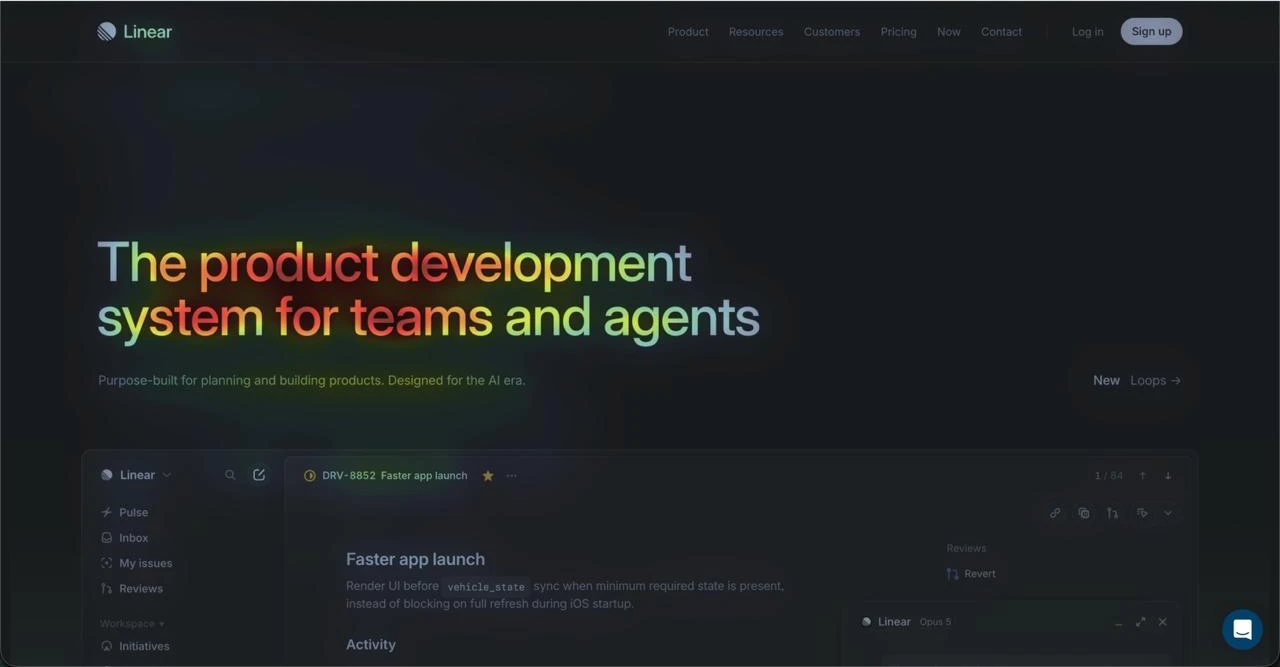
Here is the same saved Linear homepage through three attention tools. Look at the headline, the product preview, and the Sign up action in the top-right corner. Which prediction looks most useful for the design decision you would make?

Swipe to compare all three

AttentionProof

Predicted attention
Saved AttentionProof prediction over the same Linear design, with stronger heat on the headline and product preview than on the header actions

The headline and product preview lead. The header actions, including Sign up, have much less visual emphasis.

Saved prediction overlay · Open image

Attention Insight

Predicted attention
Saved Attention Insight prediction over the Linear homepage, with warm areas on the headline, product preview, New Loops link, and logo

The headline and product preview draw heat. The New Loops link and Sign up action are visible in the prediction too.

Saved overlay with vendor watermark · Open image

EyeQuant

Predicted attention
Saved EyeQuant Engaged attention view of the Linear homepage, concentrating visible heat on the headline rather than the Sign up action

In the saved Engaged view, the headline carries the visible heat. The Sign up action is comparatively quiet.

Saved Engaged view, browser bar removed · Open image

What stands out to you?

The Sign up action appears most pronounced in the saved Attention Insight overlay. EyeQuant and AttentionProof give it less visible emphasis. That is a difference in predictions, not a measured accuracy result.

See the full comparison

MIT/Tübingen benchmark: AttentionProof has no published MIT300 score or rank yet. We will show the official result here if it is listed. View the benchmark

How to judge this comparison

These are saved outputs of the same visible design, not a controlled accuracy test. We cannot verify identical uploaded bytes, crops, settings, model versions, or run dates for all three. EyeQuant shows its Engaged mode. Heatmap color scales also differ, so color intensity cannot be compared numerically across vendors. Deciding which prediction is accurate requires human eye-tracking ground truth under matched conditions.

Our MIT/Tübingen benchmark submission is pending an official published result. No ranking is claimed today.

Linear UI is an independent example, not an endorsement by Linear or either competitor. The EyeQuant display omits the private browser address bar; prediction pixels are unchanged.

Product Agent MCP attention data Creative direction

Attention heatmaps for A/B tests

See what each ad makes visible.
Measure what people do.

Keep every creative, AttentionProof heatmap, hypothesis and campaign result tied to the same version ID. Use the prediction to shape the next variant; use Meta or your testing software to measure the outcome.

Your agent records

  • Each ad version and its attention heatmap
  • Where predicted attention concentrates
  • What changed and why it might help

Saved in your chosen project folder, with a version ID for each creative.

Your ad platform measures

  • Click-through rate and purchases
  • Cost per acquisition and return on ad spend
  • Which variant performed best in the test

Add the campaign results to the same version IDs. Campaign data is not imported automatically.

Use the prediction. Keep testing the outcome. A heatmap predicts visual attention. It does not measure gaze, clicks or sales.

Before you start

A few clear answers.

What does AttentionProof do, and what does my agent do?

AttentionProof predicts visual attention and returns the heatmap, overlay and attention data. Claude or Codex interprets the result, records the reasoning and uses its available image tools to create revisions. If your agent cannot generate images, it can prepare an editing brief instead.

Does a stronger heatmap mean a winning ad?

No. A heatmap shows what is likely to draw attention. Use it to choose a specific revision, then run both ads in your A/B testing software to measure clicks, purchases, cost per acquisition and return on ad spend. AttentionProof does not run campaigns or import their results automatically.

Where are my ads and attention notes saved?

The ad workflow asks your agent to save the creatives, heatmaps and version notes in a project folder you choose. Your AttentionProof account keeps usage metadata, not a web library of uploaded ads. Keep the version IDs when you add results from your ad platform.

How do I measure which ad performs better?

Use AttentionProof to compare predicted attention, then run both versions in the advertising or A/B testing software you already use. Your ad platform measures clicks, purchases and campaign cost.

What do I need to get started?

Start with a PNG or JPEG of your UI, ad, slide or photo. Choose your image here, then sign in to run the attention check. No agent setup is needed. New accounts include 5 free checks; each completed image analysis uses one. You can connect Claude or Codex later.

See the result
for yourself!

5 free checks. Start with your UI, or any image.